
What’s New on Firestick…. and What Hasn’t Changed in Our App
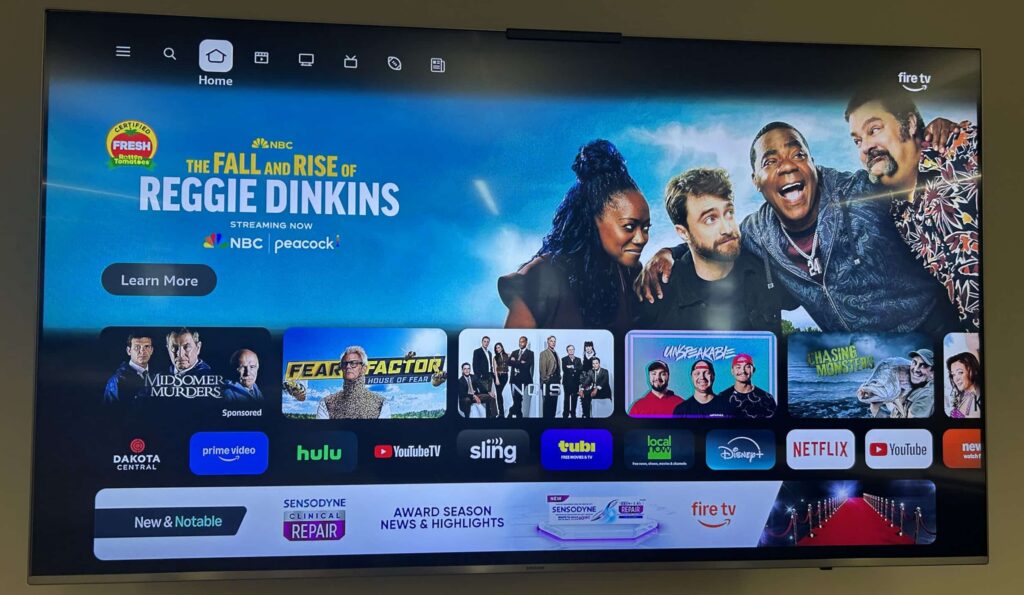
Some Dakota Central customers using Amazon Firestick devices have recently noticed something a little different when trying to access the Dakota Central streaming app. If you’ve found yourself wondering why your apps don’t appear in the same place on your Firestick home screen, you’re definitely not alone!
Here’s the most important thing to know right away:
Nothing in the Dakota Central app has changed!
Your features, channels, and overall experience are exactly the same as before. What has changed is simply how the Amazon Firestick arranges within its interface. Fire TV occasionally updates its layout, which can slightly shift how you navigate to your apps, even though the apps themselves don’t change.

A Small Firestick Update: Your Apps Are Now Found by Navigating Down
On previous versions of the Firestick home screen, users often navigated to the right to access their list of installed apps. If you’re used to that route, it may feel like the apps “disappeared” after the latest interface update.
But don’t worry- they’re still there!
Here’s what to do now:
Use the same navigation ring on your Firestick remote (the circular directional pad shown in left graphic).
Instead of pressing RIGHT, you’ll now press DOWN (what the arrow is point to in the graphic on the left).
This brings up the Fire TV apps panel, where all your installed apps (including the Dakota Central app) are still located.
This is simply a change in how Amazon organizes the menu, not anything Dakota Central has altered.
Selecting the Dakota Central App Works Exactly the Same as Before
Although the path to the app shifted slightly, opening it works just like it always has. Once you’ve highlighted the Dakota Central app icon in your list of apps, simply:
Press the SELECT button: the round center button inside the navigation ring (shown in the graphic to the right).
This opens the app exactly as it did before, with no changes to your functionality or viewing experience.

The Bottom Line: The App Is the Same, Firestick Just Moved It
To summarize:
- The Dakota Central app has not been updated or changed.
- Only the location of your apps on the Firestick home screen has changed due to Amazon’s interface update.
- You’ll now navigate down instead of right.
- You’ll still press Select to launch the Dakota Central app.
These kinds of layout adjustments are normal for Firestick and other streaming platforms. Amazon updates the Fire TV interface from time to time to add new features or reorganize content, and this shift in app placement is one example.
Rest assured, your Dakota Central app experience remains exactly as you expect. If you run into any difficulties finding or opening the Dakota Central app, or if you’d like help navigating your Firestick, we’re always happy to assist!
Our support team can walk you through the steps or troubleshoot any issues you might encounter. Call us at 952-1000!!

